All Documents Reader:PDF/Word
- 4.3
- Rating
- 1.00M
- Installs
- Free
- Price
 Analysis by App-foxy
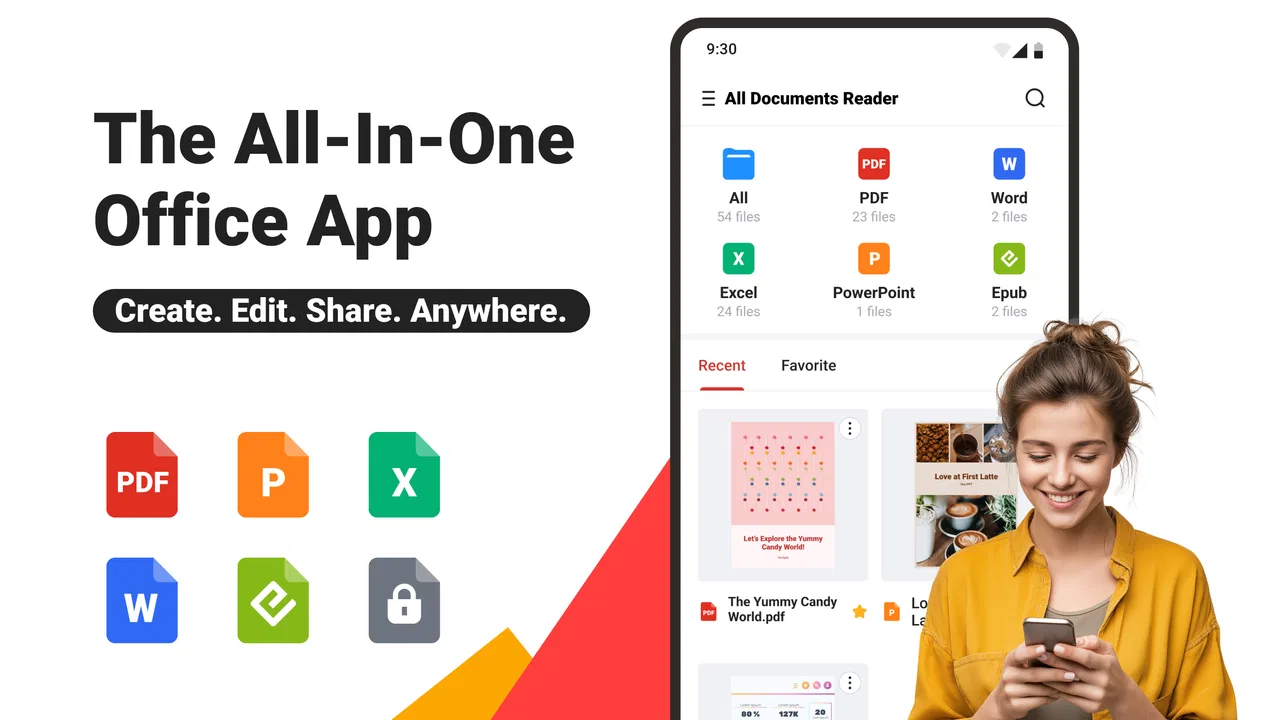
Opening a document on a phone should be a simple task, but it often becomes a search through separate viewers, download folders, and apps that handle only one file type. All Documents Reader:PDF/Word takes a broader approach. Developed by Ora Tools, this free tools app is designed as a single place for reading common documents, with its main appeal being convenience rather than specialist editing. After spending time with it, I see it as a practical option for people who regularly receive files but do not want a different reader for every format.
My first impression is that the app is aimed at reducing small everyday annoyances. You install it, look for a document, and try to read it without being pushed into a complicated office suite. That makes it especially approachable for a first-time user who needs to open a PDF or Word file quickly. At the same time, it is important to understand the boundary: this is primarily a document-reading tool, not a complete replacement for a dedicated word processor or a full desktop office package.
What to expect before opening your first file
The app has a 4.3 average from around 8.6 thousand ratings, and it has passed the one-million-install mark. Those figures suggest that its basic purpose is easy for many people to understand: gather document access in one mobile utility. The age rating is Everyone, so it is presented as suitable for general users rather than a narrowly specialized audience.
You May Also Like

 Blood Strike: 2.5 Anniversary
Blood Strike’s Loadouts Turn Every Drop Into a Tactical Gamble
A close look at Blood Strike’s custom loadouts: how fast access to signature weapons reshapes its battle royale rhythm, rewards preparation, and narrows the gap between fights.

 Pandora - Music & Podcasts
Pandora’s Music Is Easy to Start, but Harder to Recover
Pandora’s strength is its low-effort path from a seed to a station. Its weak spot is how much confidence it asks you to place in connection, setup, and quiet recovery.

 8 Ball Pool
 Is Built on Rivalries, Rematches, and Routine
A close look at the rivalries, rematches, shared routines, and unanswered safety questions that turn a quick pool match into a persistent mobile community.

 Samsung Music
’s Quiet Strength Is Playing What You Already Own
Its reach comes less from spectacle than from dependable access to a personal library. That simplicity is both the app’s strongest retention engine and its ceiling.

 AccuWeather: Weather Radar
AccuWeather Review: A Quick, Clear Forecast for Everyday Decisions
For everyday plans, the best forecast is the one you can understand quickly. AccuWeather makes rain timing, radar, and local conditions easy to act on, with a few trade-offs.

 Hill Climb Racing
Why Hill Climb Racing Still Turns Crashes Into One More Run
A tiny car, a bumpy hill and one more upgrade: Hill Climb Racing keeps resurfacing because its simple chaos makes every near-miss feel personal.
More From Our News Desk



The strongest reason to try it is the mixed-document situation. Imagine receiving a PDF timetable in a messaging app, a Word attachment from a colleague, and an older file saved in your downloads folder. With separate readers, each item can lead you into a different app. A combined reader gives you a more predictable starting point, which is useful when the priority is simply seeing the contents.
I would not approach it expecting advanced collaboration, detailed layout editing, or the deep formatting controls found in office software. If your work depends on tracked changes, complex spreadsheets, document authoring, or precise page design, a specialist application remains the better choice. The value here is in opening and reviewing documents with less app switching.
The app is free to install, while optional in-app purchases range from $3.99 to $89.99 per item. That makes it sensible to begin with ordinary reading tasks before deciding whether any paid option is worthwhile for your routine. I would avoid paying immediately just because a prompt appears during setup; first check whether the free experience already solves the problem you actually have.
Who will get the most from it
I think it suits students checking handouts, travelers carrying tickets or itineraries, families opening forms, and workers who mainly need to inspect attachments away from a computer. It is also helpful for anyone whose phone has accumulated documents in several locations and wants one familiar place to begin.
It is less convincing for people who create documents all day. A reader can be excellent at displaying information while still being the wrong tool for writing a report, rebuilding a table, or preparing a polished presentation. That distinction matters because the phrase “all documents” can sound broader than the actual job most readers need to perform.
Getting set up without unnecessary friction
All Documents Reader:PDF/Word is currently listed as version 3.8.1 and supports devices running Android 8.1 or later. Before installing, I would check the operating system on an older phone, especially if it has been kept for basic travel or family use. On a compatible device, the first useful goal is not to explore every screen; it is to locate one document you already need.
After installation, start with a file that is easy to recognize, such as a PDF saved in your downloads area or a Word attachment you recently received. This gives you a clear test. You are not guessing whether the app works in theory; you are checking whether it can take you from a familiar file to readable content with minimal effort.
A useful first habit is to keep the file’s original location in mind. If you opened it from an email or a chat, the app may be working with a copy or an exported version rather than the original conversation attachment. That matters later when you need to find the same document again. I recommend noting the folder or source the first time, instead of assuming every reader will organize files exactly as you do.
For a new user, the safest setup path is deliberately narrow:
Install the app on a compatible device.
Choose one ordinary PDF or Word file that you already know.
Open it and confirm that the text, pages, and general layout are comfortable to read.
Only then explore additional document locations or optional features.
This approach also helps reveal whether the app fits your personal workflow. A document reader can feel excellent when your files are stored locally but less convenient if your entire routine depends on a particular cloud service or office platform. The important test is the route you use every week, not a one-off file that happens to open successfully.
The first successful action
The first meaningful success is simple: open a document and find the information you needed. For example, if a school sends a PDF schedule, I would open it, move through the pages, locate the relevant date, and close the app knowing exactly where the file came from. That is a better test than merely launching the reader and looking at its home screen.
For a Word document, I would check more than whether the text appears. I would look at headings, paragraph spacing, lists, and any tables that are important to the message. Mobile readers sometimes make long documents feel different from their desktop versions, so a quick visual check prevents surprises when a page contains columns, forms, or tightly arranged information.
For PDFs, the practical test is navigation. Try moving directly to a later page, then return to the section you need. If the file is a manual or a long set of instructions, this matters more than the opening screen. A reader earns its place on your phone when it helps you return to useful information without making you start over each time.
One non-obvious tip is to use a small, familiar file for the first test rather than a huge work document. If something feels slow or visually awkward, you will know the issue is not simply the complexity of the file. Once the basic path feels comfortable, move on to the documents that matter more.
Making everyday document checks easier
Consider a realistic situation: I am leaving home and receive a Word attachment containing appointment instructions. I do not need to edit the document or create a response inside it. I need to open it, confirm the address and time, and perhaps return to it later. A single reader is useful here because it keeps the task focused. I can treat the app as a viewing stop between the message and the information I need.
Another good use is preparing for a journey. I might keep a booking confirmation, a travel note, and a scanned form on the phone. Rather than remembering which application opens each item, I can begin with the same document tool. The benefit is modest but real: fewer decisions when I am already busy.
Students can use the same workflow for lecture notes or assigned readings. I would suggest opening the file before class or before traveling, then checking that the important pages are readable on the phone’s screen. This is not a substitute for organizing study material properly, but it can make a last-minute review more dependable.
There is also a useful privacy-minded habit, even without treating the reader as a storage system: avoid leaving sensitive documents open when handing your phone to someone else. A document reader makes access convenient, and convenience means you should remain aware of what was last displayed. Close the file or return to a neutral screen when the document contains personal, financial, or work information.
Common confusion and where the limits appear
The biggest possible misunderstanding is assuming that a reader automatically provides the same controls as an office editor. Opening a Word file does not mean you should expect to revise its structure, preserve every complex element, or prepare a final publication-ready version. For serious editing, I would move the document into an application built for authoring and use this app mainly for quick inspection.
Another point of friction is file organization. A combined reader can make opening formats easier, but it does not magically fix a messy downloads folder. If you keep several copies of the same document, the challenge becomes identifying the current one. My practical advice is to rename important files clearly before saving them, especially when a message app creates vague attachment names.
Large or unusually formatted documents deserve extra caution. A simple letter is a fair test of reading comfort, while a form with dense tables or a document designed for wide screens may be harder to use on a phone. If the exact layout is critical, compare the mobile view with the original source before relying on it for a final decision.
The free model also deserves attention. Since optional purchases are available, read each purchase screen carefully and decide whether it offers something you genuinely need. I would not treat payment as a requirement for basic evaluation. Use the app with the documents that matter to you first, then judge the value based on repeated use rather than on a feature list.
There is a trade-off compared with using separate official readers. Dedicated PDF or Word apps may provide deeper controls for their own formats, while a multi-format tool can be more convenient when your files are mixed. The choice depends on whether you value breadth or specialist depth. I prefer this app when I need a common doorway into different documents; I would choose a dedicated editor when the file itself is part of a larger production workflow.
A practical next step after the first file
Once the first document opens correctly, test the app with three different situations: a short PDF, a longer PDF, and a Word file containing more structure than plain paragraphs. This small trial exposes the strengths and weaknesses that a store summary cannot show. You will learn whether the reader is comfortable for quick checks, whether navigation suits longer material, and whether the formatting you depend on survives the mobile view well enough.
I would also build a simple personal routine around it. Keep frequently needed files in a recognizable folder, remove outdated copies, and open important documents before you are offline or in a hurry. The reader can simplify access, but it cannot decide which version of a form is current or whether a file was downloaded completely. A little organization makes the app feel much more reliable.
For someone who only opens a document once every few months, the built-in viewer already available through another app may be enough. Installing another tool adds value when mixed formats are a regular part of your day. That is the clearest decision point: do you need a dependable general reader, or do you need a specialist workspace?
My overall view is favorable, with realistic expectations. Ora Tools has made a straightforward utility for people who want to read PDFs and Word documents without constantly changing applications. It is free to start, rated Everyone, and supported on Android 8.1 and later, which makes it approachable for a broad range of users. The app’s main strength is not replacing every document tool; it is shortening the path from “I received a file” to “I can read what matters.”
My recommendation is to try it with a real document you need today, not with an imaginary future workflow. If it opens your common files comfortably and saves you from app switching, it has earned a place on your phone. If you need detailed editing, strict layout control, or a full office environment, keep a specialist alternative available. Used for the job it handles best, All Documents Reader:PDF/Word is a sensible, approachable addition to a mobile toolkit.
FAQs for All Documents Reader:PDF/Word
01What file formats does All Documents Reader support?
All Documents Reader supports a wide range of file formats including PDF, Word, Excel, PowerPoint, and text files. This versatility ensures that you can view and manage various document types without needing multiple apps, making it a convenient all-in-one solution for document management on your device.
02Is All Documents Reader free to use?
The app offers a free version that includes basic features for document reading. However, there may be in-app purchases or a premium version that unlocks additional functionalities, such as advanced editing tools, ad-free experience, or cloud storage integration. Always check the app store for the latest pricing details.
03How user-friendly is the interface of All Documents Reader?
All Documents Reader is designed with a user-friendly interface that caters to both beginners and experienced users. The intuitive layout allows easy navigation through documents and quick access to essential features, helping users efficiently manage their files without a steep learning curve.
04Can I edit documents with All Documents Reader?
While All Documents Reader primarily focuses on reading documents, it may offer basic editing features such as annotations or highlighting, depending on the version. For more extensive editing capabilities, users might need to upgrade to a premium version or use complementary apps specialized in document editing.
05Does All Documents Reader require an internet connection?
All Documents Reader can be used offline for viewing and reading documents stored on your device. However, features like cloud storage access, online document downloads, or updates may require an internet connection. It's advisable to have occasional connectivity to access the full range of app functionalities.
Pros
- Supports multiple file formats seamlessly.
- Quick and easy file browsing.
- User-friendly interface design.
- Offline access to documents.
- Lightweight and fast performance.
Cons
- Ads can be intrusive at times.
- Limited editing features available.
- No cloud integration support.
- Occasional crashes on large files.
- Lacks advanced annotation tools.

All Documents Reader:PDF/Word
Gallery